Logo
  • Mission
      • Mission
      • Principles
      • Excellence Manifesto
      • Signatories
    • Close
  • Resources
    • 100 Series
      • 101in BIMe Initiative Explainer
      • 102in BIMe Initiative Knowledge Structures
      • 103in BIMe Initiative Projects
      • 104in BIMe Initiative Network
    • 200 Series
      • 201in BIM Competency Table
      • 211in Model Uses List
      • 291in Conceptual BIM Ontology
    • 300 Series
      • 301in BIM Maturity Matrix
      • 351in MUT Guide
    • 700 Series
      • 721in.A3 Extended Descriptions
      • 725in.E Macro Adoption
      • 726in.F2 Model Use Templates Strategy
      • 726in.F3 Software Selection
    • 800 Series
      • 801in BIM Dictionary Guide
      • 802in BIMe Materials Translation Guide
    • 900 Series
      • 901in BIMe Initiative Sponsorship
    • Resources Archive
    • Close
  • Projects
    • All Projects
    • A | BIM Dictionary
      • Dictionary Teams
      • Development Route
    • B | Knowledge Sharing
      • Topics List
      • Knowledge Structure
        • Knowledge Blocks
        • Knowledge Views
          • BIM ThinkSpace Blog
          • BIM Framework Blog
          • BIMe Initiative YouTube Channel
    • C | Competence & Learning
      • Benchmarking Qatar
    • D | Performance Improvement
    • E | Macro Adoption
      • Current Studies – Explainer
      • Platform Instructions – Study Coordinators
      • Expression of Interest
      • Completed Studies – Previous Phases
      • Project Overview – Work Packages
    • F | Integrated Information
      • Model Use Templates
    • Close
  • Community
    • Our Volunteers
    • Volunteering
    • Contact Us
    • Privacy
    • Close
  • Supporters
Jump

35. Point of Adoption

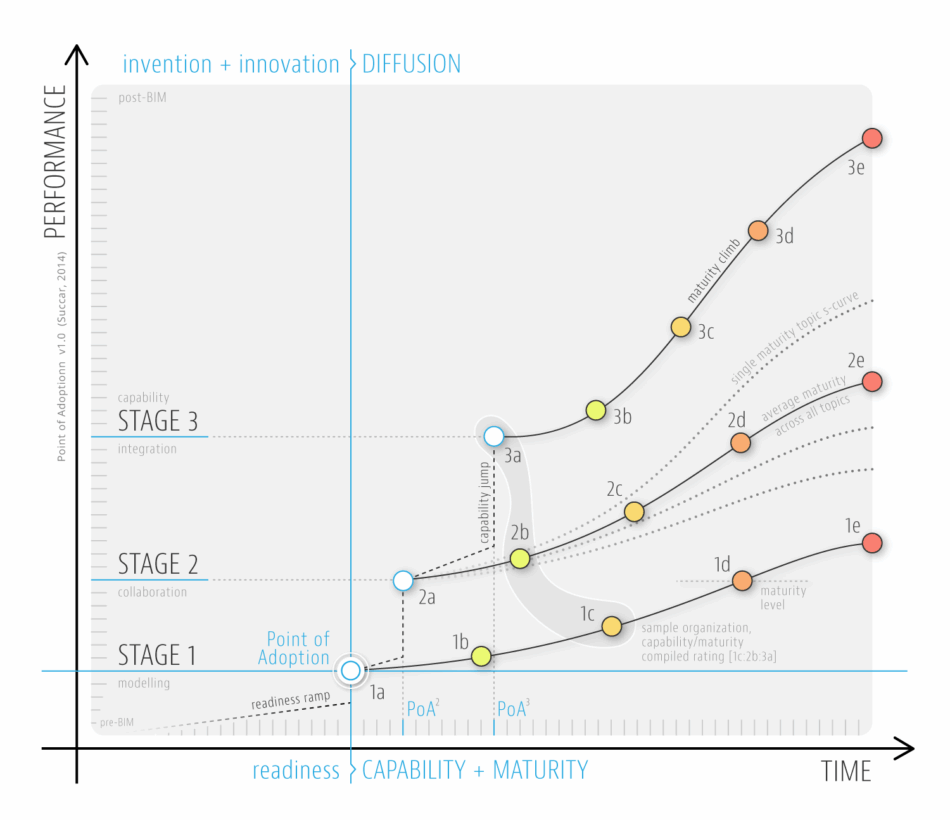
The Point of Adoption Model highlights how capability stages and maturity levels are used to assess/facilitate BIM implementation within organization and – in combination with other Framework parts – BIM diffusion across markets.

Bilal SuccarBIMCapabilityFrameworkImplementationMaturityVisual Knowledge Model

34. Diffusion Areas

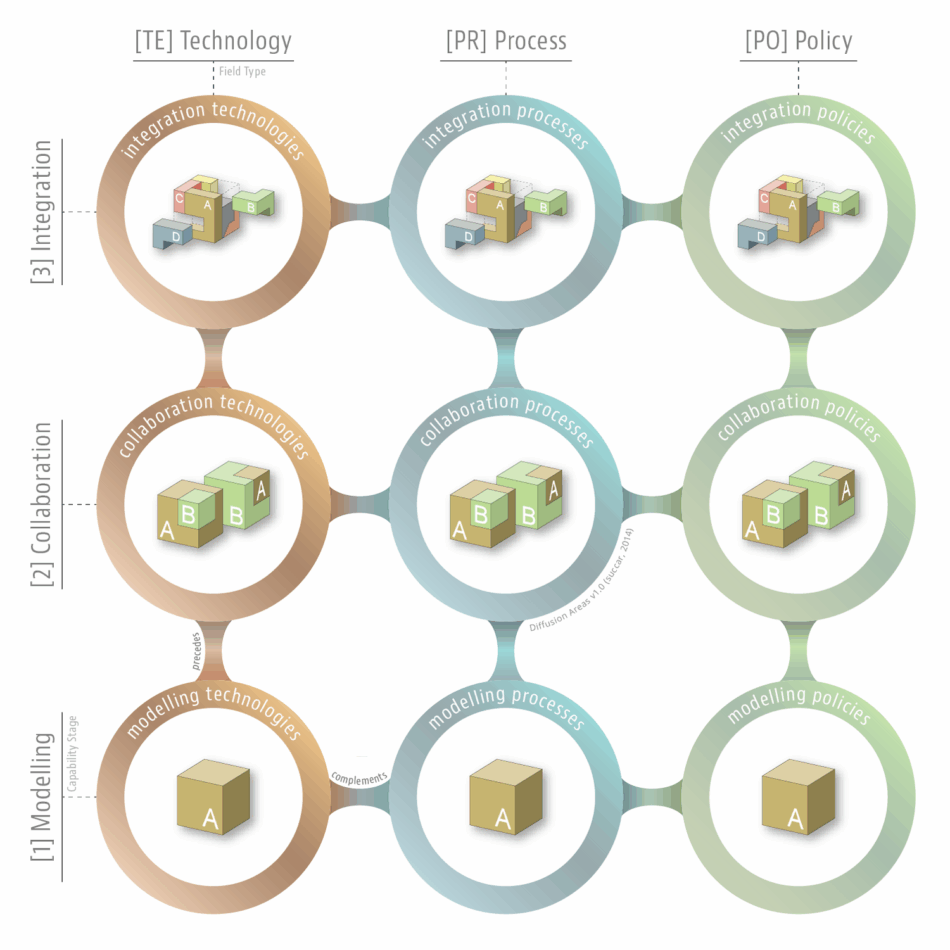
This Diffusion Areas model/matrix/chart clarify how BIM Field types interact with BIM Capability Stages to generate nine areas for targeted BIM diffusion analysis and BIM diffusion planning.
FrameworkMaturityVisual Knowledge Model

26. Macro Maturity Components

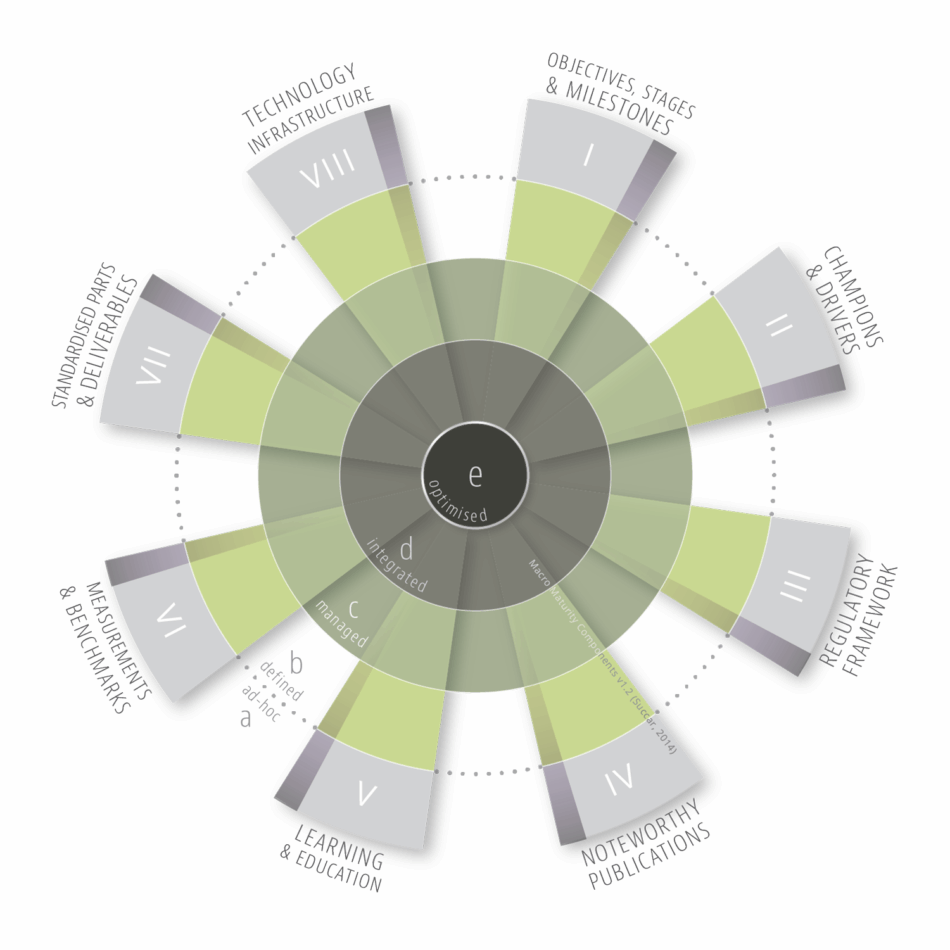
The Macro Maturity Components model identifies eight complementary components for measuring and establishing the BIM maturity of whole markets.

FrameworkMaturityVisual Knowledge Model
Image

BIMe Initiative by

CHANGE AGENTS AEC

CONTACT US
SUBSCRIBE
PRIVACY
TERMS
ADMIN

ThinkSpace


Frameworks


Macro Adoption


BIM Dictionary ⇑

Manage Consent
To provide the best experiences, we use technologies like cookies to store and/or access device information. Consenting to these technologies will allow us to process data such as browsing behavior or unique IDs on this site. Not consenting or withdrawing consent, may adversely affect certain features and functions.
Functional Always active
The technical storage or access is strictly necessary for the legitimate purpose of enabling the use of a specific service explicitly requested by the subscriber or user, or for the sole purpose of carrying out the transmission of a communication over an electronic communications network.
Preferences
The technical storage or access is necessary for the legitimate purpose of storing preferences that are not requested by the subscriber or user.
Statistics
The technical storage or access that is used exclusively for statistical purposes. The technical storage or access that is used exclusively for anonymous statistical purposes. Without a subpoena, voluntary compliance on the part of your Internet Service Provider, or additional records from a third party, information stored or retrieved for this purpose alone cannot usually be used to identify you.
Marketing
The technical storage or access is required to create user profiles to send advertising, or to track the user on a website or across several websites for similar marketing purposes.
  • Manage options
  • Manage services
  • Manage {vendor_count} vendors
  • Read more about these purposes
View preferences
  • {title}
  • {title}
  • {title}