
Jump
This numbered Frameworks Page covers a single Visual Knowledge Model (VKM). Refer to Tags at the bottom for content classification and source publication if any. The page may be updated to connect with newer Frameworks Pages. The number is for pages, not for content.
Published on July 8, 2026 | Last Updated on July 8, 2026
This post is a follow-up and an extension of the Information Cycle Model (post 44), which connects several Information Milestones from the LITE framework through three high-level actions: Prepare, Manage, Use. Each action is composed of several forward execution activities paired with reverse measurement activities [1] that verify accuracy, validity and quality against the previous milestone(s) [2]. The model also identifies three Information Actors - design, delivery (construction), and utilisation (operation) responsible for these actions.
The Operation Phase – Information Actions Model introduced below identifies the granular [3] information activities during the utilisation stage of an asset lifecycle, including the relation within the Digital-Physical Couple. This couple is not specific to the utilisation phase but is often (mis)understood by the industry (using the Digital Twin terminology) as a post-delivery artefact that needs to be disconnected from its origins and reconnected to operations and maintenance through specialised frameworks, classifications and systems. This separation is, as per the LITE framework, artificial and would not survive any serious scrutiny of where or when the separation line is drawn. Large/composite assets are made of granular assets, each with its own lifecycle. That is, even if one asset type/scale [4] is in one phase of its lifecycle (e.g. a brick wall being built is in its delivery phase), its parent, sibling, or child asset may be in another lifecycle phase (e.g. a brick in the same brick wall is in its utilisation phase).
Information flow is continuous and cyclical as presented in the LITE framework's routes and loops. For illustrative purposes, Figure 1 below focuses on the operation/utilisation phase and presents the main information flows as actions connecting clusters of nodes:
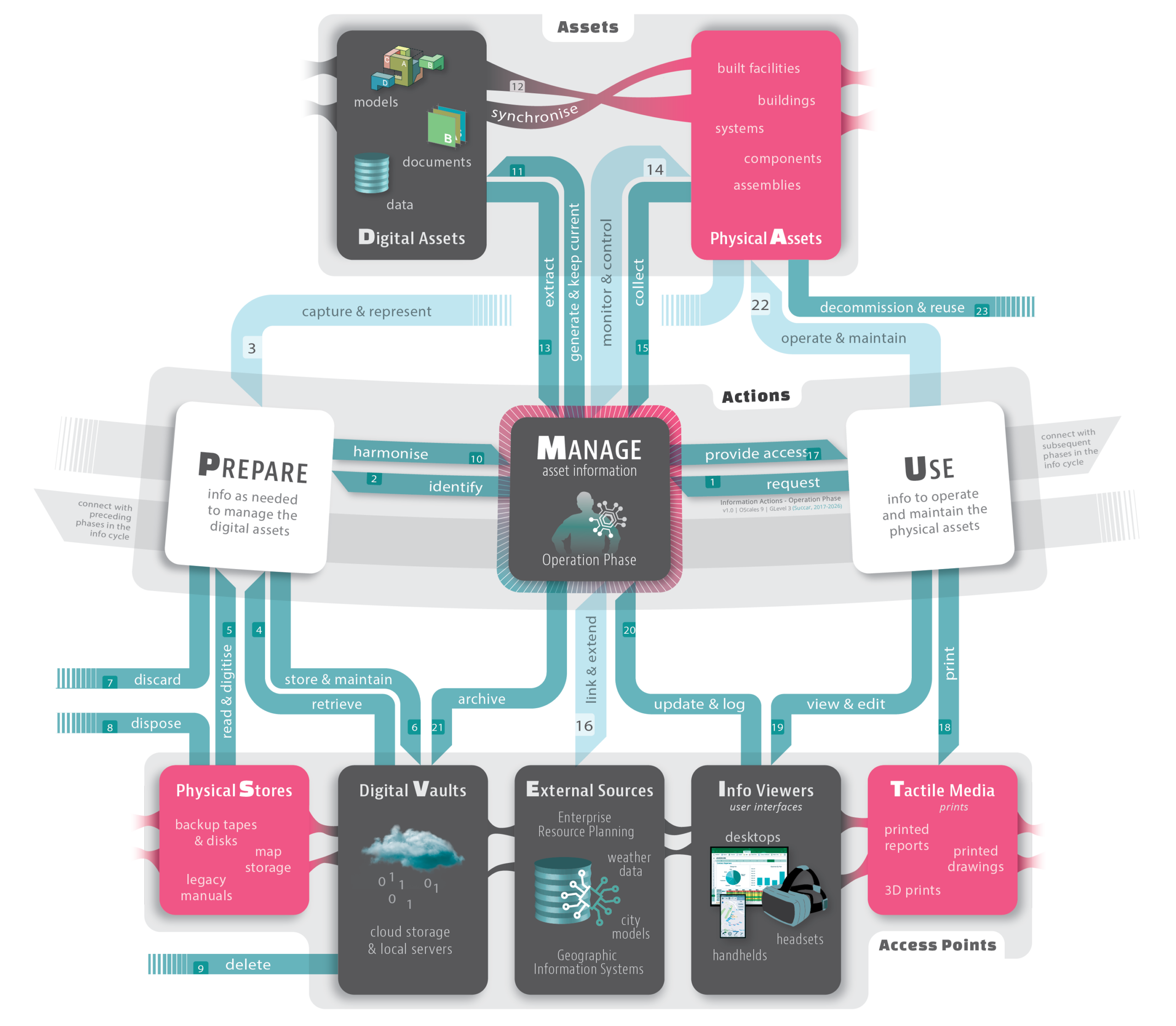
Figure 1. Information Actions Model – Operation Phase | v1.0 at OScale 9, GLevel 3. This model nests inside Post 44’s Information Cycle Model (OScale 8, GLevel 2)
Figure 1 is a stylised concept map (Novak & Cañas, 2006) with multiple nodes, links, and labels.
- The nodes are grouped into three Clusters: Actions, Assets, and Access Points. (grey background in Figure 1). To facilitate referencing, nodes have a single emphasised Capital letter (e.g., "D" in Digital Assets and "A" in Physical Assets).
- The links are the Action Flows that connect cluster members. Flows are numbered and labelled using terms from the BIMei Ontology [5]. Numbers are for visual reference and do not indicate a sequence or priority.
Clusters
Actions Cluster
The Actions cluster represents the high-level Information Actions – Prepare [P], Manage [M], and Use [U] - that need to be performed during the Operation Phase. These actions in the Operation Phase are connected to – and may even be concurrent with – the corresponding Information Actions in preceding and subsequent phases (refer to Information Cycle model).
Assets Cluster
The Assets node represents the intertwined relations between the Digital-Physical couple: the physical asset (e.g. a building, pump, or truck) and the corresponding digital asset that mirrors its informational/functional attributes:
- Digital Assets represent all the Models, Documents, and Data sets generated and maintained throughout an Asset’s lifecycle. These Digital Assets may be (a) hosted on local servers or in the cloud; (b) accessed/manipulated through dedicated applications, APIs (Application Programming Interface)s or MCPs (Model Context Protocol)s; and (c) updated either manually and/or automatically through Asset Coupling with corresponding Physical Assets; and
- Physical Assets represent either a single Physical Asset of any Asset Scale, or a portfolio of assets, their systems, components, and parts. These Physical Assets are designed/built during earlier lifecycle phases; renovated during the Operation Phase; and then potentially demolished and/or reused in other projects at the end of their lifecycle.
Access Points Cluster
The Access Points node represents where information can be accessed – these include:
- Physical Stores represent the dedicated rooms, storage cabinets (and similar) where tactile media – e.g. printed maps, hand drawings, and backup tapes - are stored. Physical Stores may be onsite – where the asset is located - or offsite;
- Digital Vaults represent the computer servers and cloud services – owned by the asset operator or by third parties – that host the digital information;
- External Sources represent the databases and datasets which, when linked to, extend the information available for management and utilisation (Mirarchi, Pavan, De Marco, Wang, & Song, 2018). These databases/datasets may include City Models, Geographic Information Systems (GIS), real-time traffic data, historic weather data, and similar. For asset operations specifically, External Sources also include semantic layers such as Brick Schema, Project Haystack, and RealEstateCore – aligning equipment, points, spaces, and portfolios – and other data architectures - e.g. the Unified Namespace (UNS) - to carry live Actual-Status signals from operational systems.
- Information Viewers represent the software tools – e.g. Acrobat, Revit, Solibri, Excel, Tableau, etc. – which can be used to display, manipulate and populate a multitude of Information Views (refer to Project Information Taxonomy); and
- Tactile Media represent all the materials printed for reference and utilisation. These include paper documents, 2D drawings, 3D prints, and similar.
Information Flows
The three clusters and their members are linked by information activities: each is a forward Execution activity, paired with a reverse Measurement activity that checks it and is governed, as per the LITE framework, by an Information Protocol (PR). Table 1 below clarifies the flow of information during the Utilisation/Operation Phase:
Table 1. Activities within the Information Actions Model – Operation Phase. All activities can be human-led, agent-led or a hybrid.
|
Activity Title (Competency Sets and Competency Topics [6]): |
Forward Execution action (F) |
Paired reverse Measurement action (R) |
Level 2 Action |
Description The tasks and steps to be followed to initiate, conduct, and complete each separate activity |
Protocols (PR) The documentation to be consulted or followed [7] |
|
|
1 |
Request needed info (Technical Topic) |
Request access to the required Asset Information |
Confirm the request is complete and authorised before it is actioned |
Prepare |
Requesting access to information that enables the operation, management, and maintenance of a Physical Asset. The request can be made by a human/machine actor or via a system event |
PR1. Information Request Protocol |
|
2 |
Identify needed info (Technical Topic) |
Identify the Asset Information required to support operation and maintenance |
Assess the request to access Asset Information; verify the identified information set is sufficient and at the required Level of Detail |
Prepare |
Identification of all information needed to enable the management and maintenance of the Physical Assets. The ‘Identify’ activity needs to clarify the types of information (e.g. formats, date ranges, etc.) that need to be collated from varied sources and at what Level of Detail (geometric and semantic) |
PR1. Information Request Protocol |
|
3 |
Capture & Represent Physical Assets (Operation Set ★) |
Capture and represent the current state of Physical Assets |
Verify the captured representation matches the physical asset’s as-is state to the targeted Level of Accuracy |
Prepare |
Using Reality Capture methods (e.g. As-constructed Representation, Generative Design, Laser Scanning, Photogrammetry, Record Keeping, Surveying) to accurately represent the Physical Asset in its as-is state. Reality Capture and respective verification [8] can be conducted using a combination of tools and methods: measuring tapes, cameras, sensors, and scanners (e.g. laser and LiDAR) – whether mobile, stationary, or embedded within Physical Assets. What tools and methods are used depend on the Degree of Autonomy and the targeted Level of Accuracy and Level of Detail |
PR2. Information Capture & Preparation Protocol |
|
4 |
Retrieve info (Technical Topic) |
Retrieve Asset Information from authorised sources |
Check the retrieved information is complete, current, and from an authorised source |
Prepare |
Retrieval of usable Asset information from a Digital Vault (e.g. from a file server or a cloud service) and/or from a Physical Store (e.g. a map cabinet or backup tape) |
PR5. Information Storage & Disposal Protocol |
|
5 |
Read & Digitise info (Technical Topic) |
Digitise physical information and extract digital content |
Verify the digitised content against the source artefact (e.g. OCR accuracy) |
Prepare |
Reading information from digital artefacts and from the digitisation of documents, drawings, and maps, and the 2D/3D scanning of physical artefacts. This is typically conducted using document scanners; 3D scanners (handheld, desktop, robot-mounted, or drone-mounted); and their related software (e.g. Optical Character Recognition, Computer Vision, or similar) |
PR2. Information Capture & Preparation Protocol |
|
6 |
Store & Maintain info (Technical Topic) |
Store and maintain Asset Information for future retrieval |
Confirm stored information is retrievable, intact, and backed up |
Manage |
Storage of digital and physical artefacts. Digital artefacts/information are stored on hard drives, optical disks, or similar media. Physical artefacts (e.g. maps, tactile products, and even cut-out models) are stored in dedicated cabinets or rooms |
PR5. Information Storage & Disposal Protocol |
|
7 |
Discard info (Technical Topic) |
Discard information that has no ongoing operational value |
Assess whether the information truly has no ongoing operational value before it is discarded |
Manage |
Discarding of collated Asset information when deemed unusable or not valuable enough to store for later reuse |
PR5. Information Storage & Disposal Protocol |
|
8 |
Dispose info (Technical Topic) |
Dispose of physical information securely |
Verify that secure disposal was completed per protocol (chain-of-custody) |
Manage |
Destruction of previously-stored physical artefacts (e.g. shredding of documents) and their safe disposal |
PR5. Information Storage & Disposal Protocol |
|
9 |
Delete info (Technical Topic) |
Delete redundant digital information |
Confirm the information is redundant and has been safely purged, with no residual copies |
Manage |
Deletion and subsequent purging of information if marked redundant or unsuitable for digital storage |
PR5. Information Storage & Disposal Protocol |
|
10 |
Harmonise new info (Technical Topic) |
Harmonise collected information for its intended operational use |
Assess collected information for its intended operational use; validate harmonised information against Intended Use, Defined Purpose, and applicable standards |
Prepare: Manage |
Inspection, harmonisation, and normalisation of collected information to match Intended Use, Defined Purpose, and applicable standards. Harmonisation of info may include reduction (removing unnecessary details), augmentation (adding of missing details), and association (connecting information to each other using classification or semantic linking) |
PR2. Information Capture & Preparation Protocol |
|
11 |
Generate & Keep Current (Technical Topic) |
Generate and maintain current Asset Information |
Verify that the generated and updated information matches physical reality |
Prepare: Manage |
Maintenance of collated information to match physical reality, plus the development of new 3D digital models, documents, and data sets |
PR3. Information Generation & Update Protocol |
|
12 |
Synchronise info (Technical Topic) |
Synchronise Digital Assets with their corresponding Physical Assets |
Validate the Digital Twin against its Physical Asset (synchronisation drift and fidelity) |
Prepare: Manage |
Development and maintenance of a Digital Twin through Asset Coupling, where the Digital Assets are synchronised with the Physical Assets (potentially using the AAS standard) |
PR3. Information Generation & Update Protocol |
|
13 |
Extract info (Technical Topic) |
Extract Asset Information to support operational activities |
Check that the extracted information is accurate and fit for the operational activity |
Prepare: Manage |
Extraction of information from Digital Assets for the purposes of operating, managing, and maintaining Physical Assets |
PR4. Information Utilisation Protocol |
|
14 |
Monitor & Control Physical Assets (Operation Set ★) |
Monitor and control the performance of Physical Assets |
Evaluate monitored performance against expected thresholds and targets |
Manage: Use |
Monitoring (e.g. Performance Monitoring, Real-time Utilisation, Structural Health Monitoring) of the current state, usage, or performance of a Physical Asset, its systems and components. Also, the control of Physical Assets through Building Automation or similar. This is conducted through sensors, scanners and cameras located/ embedded within the Physical Assets; software and middleware tools to manage data streams from and control the performance of the Physical Assets |
PR4. Information Utilisation Protocol |
|
15 |
Collect info (from site) (Technical Topic) |
Collect operational information from Physical Assets and their environment |
Verify collected site information for completeness and reliability (e.g. sensor calibration) |
Prepare |
Collection of information from the site to guide the operation and maintenance of Assets – information collection may be: - Manual (by a human actor), automated (through sensors/RFID/Internet of Things) (Li, Xue, Li, Hong, & Shen, 2018), or autonomous (through roaming bots); - Highly structured (e.g. using machine learning), semi-structured (e.g. human collection using a COBie or Asset Operations Handover (AOH) template or tool), or unstructured (e.g. hand-written notes); and - In response to a regular service call or a scheduled/emergency work order |
PR2. Information Collation & Preparation Protocol |
|
16 |
Link & Extend info (Operation Set ★) |
Link Asset Information with relevant external information sources |
Confirm external links are valid and that exchanged data is consistent in both directions |
Manage: Use |
Pulling and Pushing of live Asset Information from/into relevant databases (e.g. City Models and Enterprise Resource Planning (ERP) systems, a Unified Namespace (UNS) for live Actual-Status signals, and semantic layers such as Brick Schema, Project Haystack, or RealEstateCore) |
PR4. Information Utilisation Protocol |
|
17 |
Provide Access to available data (Technical Topic) |
Provide authorised access to Asset Information |
Audit that the access granted matches each user’s authorised role |
Prepare |
Provision of access to information and data according to each user’s role (e.g. designer, operator, or facility user) |
PR4. Information Utilisation Protocol |
|
18 |
Print info (Technical Topic) |
Produce printed information for operational use |
Check printed output against the digital source for fidelity |
Use |
Printing of information for analysis, as physical backups, as 3D components, or for sharing information with others in low-tech environments |
PR4. Information Utilisation Protocol |
|
19 |
View & Edit info |
View and update Asset Information |
Validate edits before they are committed and logged |
Use |
Viewing (and editing) of information using Model-, Document- or Data- Viewers as needed |
PR4. Information Utilisation Protocol |
|
20 |
Update & Log info (Technical Topic) |
Update Asset Information and record operational changes |
Verify the update log is complete and traceable (audit-trail integrity) |
Manage |
Updating and logging of Information within the Common Information Environment based on input received/requested from the user |
PR4. Information Utilisation Protocol |
|
21 |
Archive info (Technical Topic) |
Archive inactive Asset Information for future reference |
Confirm archived information is complete, indexed, and recoverable |
Manage |
Archiving Information that is no longer useful within the current Information Management Cycle |
PR5. Information Storage & Disposal Protocol |
|
22 |
Operate & Maintain Physical Assets (Operation Set ★) |
Operate and maintain Physical Assets using available Asset Information |
Inspect whether operation and maintenance meet the Demand Entity’s defined expectations |
Manage: Use |
Using available information to operate a facility in accordance with requirements set by the ‘demand organisation’ (ISO, 2018). Sub-activities include Asset Maintenance, Asset Procurement, Asset Tracking, Building Inspection, Handover and Commissioning, Relocation Management, Space Management or similar |
PR4. Information Utilisation Protocol |
|
23 |
Decommission & Reuse (Technical Topic) |
Decommission Physical Assets and preserve reusable information |
Assess whether decommissioned assets and information can be reused before final disposal |
Manage: Use |
Decommissioning information for replacement or demolition of the Physical Asset (an entire built precinct or a single small component). Information reaches its End of Life (EoL), or it’s reused elsewhere |
PR5. Information Storage & Disposal Protocol |
Please note the following:
- Depending on the Degree of Autonomy (DoA), these activities can be conducted manually, with machine assistance, or autonomously.
- In Figure 1, the D, M, V, E, and I nodes (dark grey) collectively represent the Common Information Environment [9], a distributed, digital ecosystem that enables the collation and utilisation of information by multiple stakeholders. In LITE terms, this Common Information Environment is the Defined tier (Tier 1) of the Information Tiers; as these activities inspect, harmonise, and normalise information, it becomes a managed Unified Information Pool (Tier 2), and once information shares a common schema, an integrated Information Platform (Tier 3). Read together with the linked External Sources (Referenced, Tier 0) and continuously updated feeds (Optimised, Tier 4), the nodes shown here span all five Information Tiers.
- Most Information Activities pertain to the Information Management Topic [10] within the Technical Competency Set; there are four activity sets, including multiple activities, pertaining to the Operation Competency Set (★).
- The tools, standards, and schemas named as examples throughout this post - including IFC, IDS, and bSDD to COBie, AOH, Brick, Project Haystack, RealEstateCore, the Asset Administration Shell (AAS), and a Unified Namespace (UNS) - are illustrative, not prescriptive. This model is part of the LITE framework (or metaframework) and is intended as a neutral skeleton that maps each of these to their lifecycle roles rather than favouring any single stack [11]. Different configurations of tools, standards, and schemas across the whole asset lifecycle can be sequenced, federated, and eventually integrated.
Asset Unit Example
The twenty-three activities may feel abstract until we follow a single Asset Unit through them. As an example, this section applies the model to an elevator system (an Asset Unit) as it enters the Operation Phase. Let's assume it already carries a handover baseline (COBie [12]/AOH [13]) and that its Digital Couple/Twin is an AAS [14] wrapper that references up-to-date 3D digital models, documents, and datasets. The Digital Asset is kept in step with the Physical Asset through the Synchronise Action, while a Unified Namespace [15] (UNS) streams live signals (e.g. door cycles, motor current, and fault codes) that the Brick ontology maps to the unit's register within the Integrated Information Platform. Each forward execution action has a reverse measurement mirror - these include:
- During procurement, the operator requests and identifies the asset information needed to run and maintain the unit – model, serial number, spares, and maintenance regime – and verifies that the set is complete enough for planned maintenance.
- During installation, the as-installed condition is captured while it is still observable – some evidence can only be taken before the shaft is closed up – and stored against the unit’s record.
- Upon commissioning, the captured geometry is verified against the physical unit and the twin is validated for drift.
- During operations, the unit's live performance is evaluated against thresholds, so faults are predicted rather than discovered. When a service call is logged, the collected data is verified for completeness before it is updated in the record.
- At the end of life, the unit is decommissioned, and its reusable parts (physical and digital assets) are assessed for reuse.
This example exemplifies the Right-to-Left [16] (asset design/selection <-- asset construction/delivery <-- asset operation/utilisation) or, more broadly, the LITE framework's counter-clockwise flows that start from the Asset Unit's Defined Purposes [17] - why it is needed, rather than what it is or how it can be delivered.
Table 2. Asset Unit example with sample connection to schemas and tools
|
# |
Forward Execution Action (F) |
Explainer |
Reverse Measurement Action (R) |
Schema / Tool |
|
1–2 |
Request / Identify |
Operator requests the unit's asset data - model, serial, maintenance regime, spares |
Verify the set is sufficient for planned maintenance |
COBie / AOH records |
|
3 |
Capture & Represent |
Capture the as-installed state at commissioning (some data only observable within a closing evidential window) |
Verify capture matches the physical unit to target accuracy |
Evidential hold point (see earlier UVF footnote) |
|
12 |
Synchronise |
Keep the elevator's digital asset (twin) / AAS wrapper in step with the physical asset |
Validate twin against physical (drift/fidelity) |
AAS |
|
14 |
Monitor & Control |
Stream live signals — door cycles, motor current, fault codes |
Evaluate performance against thresholds (predict failures) |
UNS (transport) + Brick [18] (points/equipment) |
|
15 |
Collect (from site) |
Technician logs a service call/work order |
Verify collected data for completeness and reliability |
COBie / AOH template |
|
22 |
Operate & Maintain |
Schedule maintenance from available information |
Inspect whether O&M meets the Demand Entity's Service Level Agreement (SLA) |
Utilisation protocol and SLAs |
|
23 |
Decommission & Reuse |
At the end of life, decommission the unit and preserve reusable parts/records |
Assess reuse before final disposal (R1–8) |
Evidence Stores/archive |
Summary
The Information Actions Model for the Operation Phase sets out how information is prepared, managed, and used - and, in reverse, measured - to support the operation and maintenance of assets throughout their service life. Rather than a set of isolated tasks, its activities form an interconnected flow that links (a) Digital Assets, (b) Physical Assets, their (c) Access Points, and (d) operational tools through a (e) Common Information Environment that is progressively (f) defined, managed, and integrated across the LITE Information Tiers. Because each forward execution activity is paired with a reverse measurement one, information is not only captured, harmonised, maintained, exchanged, and applied, but also checked for accuracy, validity, and quality- thus keeping the Digital-Physical Couple continuously aligned. Each activity can, in turn, be read as a discrete Action Statement, making the model suitable not only for conceptual communication but also for competency modelling, workflow automation, knowledge-graph integration, and agentic co-creation.
Endnotes
[1] LITE defines a clean decomposition: Information Actions → Activities → sub-Activities → Tasks → sub-Tasks → Steps
[2] LITE defines four information flows: forward flows (Execution actions), reverse flows (Measurement actions), inward flows (Capture actions), and outward flows (Sharing actions). Figure 1 focuses on execution actions, with Table 1 listing only execution and measurement actions.
[3] The Information Actions Model is a Level 2 Activity Flow Diagram. To understand Activity Flow Diagrams and their levels, please refer to the 351in Model Use Template: https://bimexcellence.org/resources/300series/351in-model-use-templates-guide/
[4] Refer to Post 30 - Asset Hierarchy: https://bimexcellence.org/frameworks/asset-hierarchy/
[5] The BIMei Ontology (formerly the Conceptual BIM Ontology) is available at https://ontology.bimexcellence.org.
[6] As in previous publications, activities – as well as abilities and outcomes – can be classified using the Competency Hierarchy, which includes several Competency Tiers, Competency Sets, and Competency Topics (Succar, Sher, & Williams, 2013). Doi: http://dx.doi.org/10.1016/j.autcon.2013.05.016. http://bit.ly/BIMPaperA6
[7] Protocols are based on International Standards (e.g. ISO/CEN), National Specifications (e.g. UK’s PAS1192 series), community-developed ‘standards’ (e.g. Level of Accuracy) and applicable project- and client-specific requirements.
[8] Some capture activities are time-bound. Information about a Physical Asset may only be observable at an irreversible moment (e.g. before a wall is closed up); where that evidential moment passes un-captured, the information becomes Unverifiable (UVF) - a state no downstream loop can fully recover. This constraint sits at the Information Gates, where evidence capture can be required before progression. For a discussion covering this Verifiability, please refer to David Shepherd's LinkedIn post on June 6, 2026: https://www.linkedin.com/posts/david-shepherd-bim_this-excellent-firestopping-video-demonstrates-ugcPost-7468954482148835328-8tnU/
[9] The Common Information Environment should not be confused with the Common Data Environment (CDE) as defined in the United Kingdom’s PAS1192-2 (BSI, 2013) and later in ISO 19650 series (ISO/DIS, 2018). Depending on the capabilities of the actors executing the actions, the Common Information Environment may either be a Shared Document Environment, a Federated Modelling Environment, or an Integrated Data Environment.
[10] The Operation Competency Set collates all Model Uses. For an updated list, please refer to the 211in Model Uses List on BIMexcellence.org.
[11] Refer to LinkedIn discussion on June 22, 2026: https://www.linkedin.com/feed/update/urn:li:activity:7474812627014283264/
[12] Construction-Operations Building Information Exchange (COBie) is a specification for the capture and delivery of design/ construction information to s. COBie s can be collated using a spreadsheet template or a COBie-enabled software solution.
[13] Asset Operations Handover (AOH) is a standardised framework by buildingSMART International intended to complement or replace COBie. AOH is intended to facilitate the digital transfer of construction and maintenance information to facility owners
[14] Asset Administration Shell (AAS) is a globally recognised standardised digital representation of an industrial asset (a physical product, machine, or component). AAS is formalised under IEC 63278-1:2023, Asset Administration Shell for industrial applications - Part 1: Asset Administration Shell structure.
[15] Unified Namespace (UNS) is a data architecture or design pattern used for real-time data connections between data producers and consumers, typically applied at enterprise scale or in industrial operations environments. Using UNS reduces the need for multiple systems javing to communicate directly with one another.
[16] "Right-to-Left" design or thinking, in the context of asset information management, is attributed to the Digital Operations Working Group (DOWG), from the UK. The first mention of the term - found by the author - is in an article by Justin Kirby published by Digital Construction Plus, on December 4, 2025: https://digitalconstructionplus.com/the-usability-gap-why-compliance-is-not-enough/, last checked July 7, 2026.
[17] Defined Purposes is Information Milestone 1 within the LITE framework. It represents "the explicit reasons behind, the functions required, and the value sought (commercial, social, and/or environmental value) from procuring a new Physical Asset or operating/reusing an existing one".
[18] Brick is an open-source development effort to create a uniform schema for representing metadata in building - https://brickschema.org/
References and Further Reading
Forsberg, K., & Mooz, H. (1991). The Relationship of System Engineering to the Project Cycle. Available from https://www.damiantgordon.com/Courses/ISE/Papers/The%20Relationship%20of%20System%20Engineering%20to%20the%20Project%20Cycle.pdf
ISO (2018). Facility management - Management systems - Requirements with guidance for use. In. ISO 41001:2018
ISO (2018). ISO 19650-1. Organization and digitization of information about buildings and civil engineering works, including building information modelling (BIM) — Information management using building information modelling. Part 1: Concepts and principles.
ISO (2018). ISO 19650-2. Organization and digitization of information about buildings and civil engineering works, including building information modelling (BIM) — Information management. Part 2: Information management process
ISO (2020), SO 19650-3:2020. Organization and Digitization of Information about Buildings and Civil Engineering Works, Including Building Information Modelling (BIM)–Information Management Using Building Information Modelling. Part3: Operational phase of the assets
Li, C. Z., Xue, F., Li, X., Hong, J., & Shen, G. Q. (2018). An Internet of Things-enabled BIM platform for on-site assembly services in prefabricated construction. Automation in construction, 89, 146-161
Mirarchi, C., Pavan, A., De Marco, F., Wang, X., & Song, Y. (2018). Supporting Facility Management Processes through End-Users’ Integration and Coordinated BIM-GIS Technologies. ISPRS International Journal of Geo-Information, 7(5), 191
Novak, J. D., & Cañas, A. J. (2006). The origins of the concept mapping tool and the continuing evolution of the tool. Information Visualization, 5(3), 175-184
Succar, B., Sher, W., & Williams, A. (2013). An integrated approach to BIM competency acquisition, assessment and application. Automation in Construction, 35, 174-189. Download from here.
Succar, B., & Poirier, E. (2020). Lifecycle information transformation and exchange for delivering and managing digital and physical assets. Automation in construction, 112, 103090. Download from here.
Cite as: BIMe Initiative (2026), '45. Information Actions – Operation Phase', https://bimexcellence.org/frameworks/45-information-actions-operation-phase/. First published 8 July 2026. Viewed 6 November 2026